
The Peloton App: A Game-Changing Tool for Fitness
As a busy mom and health coach, I’m always on the lookout for workouts that are efficient, effective, and flexible enough to fit into a jam-packed schedule. Enter the Peloton app—a game-changing tool that has completely transformed the way I move, stay consistent, and find a little “me time” in the chaos of motherhood. If you’ve been wondering whether it’s worth your time, this Peloton app review will give you the honest, mom-focused perspective you need.
I first tried the Peloton app out of curiosity and convenience: I wanted variety, motivation, and something I could realistically stick with, even during hectic weeks. After years of consistent use, I can confidently say this app is a staple in my routine. In this Peloton app review, I’ll share exactly why it works so well for busy moms, how I use it, and whether it’s worth adding to your fitness toolkit.
As an Amazon Associate, I earn commission from qualifying purchases. This post may contain affiliate links, which means I’ll receive a commission if you purchase through my links, at no extra cost to you. Please read full disclosure for more information.
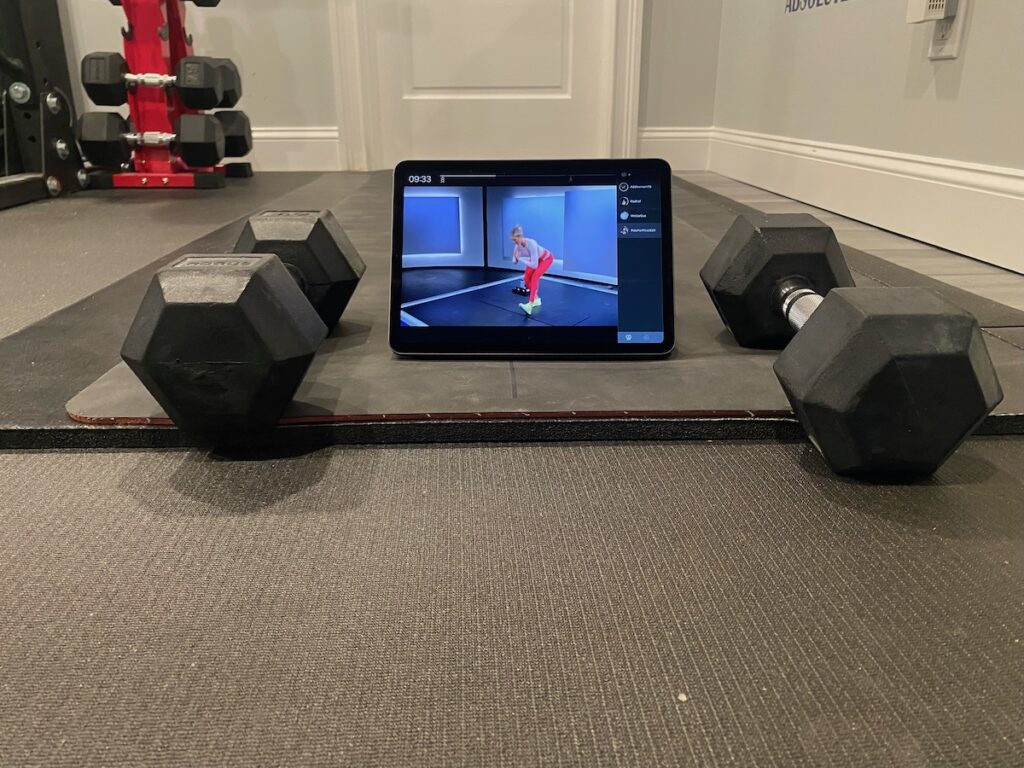
What Is the Peloton App?
The Peloton app is a subscription-based fitness platform that gives you access to thousands of on-demand and live classes. You’ll find strength, yoga, Pilates, cardio, walking, running, cycling, meditation, stretching, and many multi-week programs that help you build habits and stay consistent.
One of the biggest wins for busy moms? You can use the app with or without Peloton equipment. That means you can get a full, satisfying workout without investing in a Peloton bike or treadmill—perfect if space or budget is an issue. Overall, the app is easy to use, well stocked with classes, and flexible enough to meet you where you are, no matter how much time you have to devote to fitness. I wanted to include this quick overview in my Peloton app review so you can understand the basics before we dive into my personal experience.
My Honest Peloton App Review (From a Health Coach’s Perspective)
Here are some of the reasons why I absolutely love the Peloton app.
The Workout Variety Keeps Me From Getting Bored.
In this Peloton app review, one thing that stands out immediately is the sheer variety of classes available. Peloton’s workout library feels almost unlimited: strength, yoga, Pilates, meditation, stretching, walking, cardio—you name it. The variety keeps me engaged, and I’ve noticed the same for the people I recommend it to. With hundreds of classes in every category, you won’t be bored. Rotate your workouts daily, mix short classes with longer sessions, and explore new activities without getting bored.
The Instructors Are Truly Motivational.
What I love most about the Peloton instructors is their authenticity. They’re skilled, energetic, and professional, and they motivate without pressure. As a health coach, I appreciate that their coaching cues are accurate and safe, making it easy to follow along. They’re a mix of personalities – some feel like a friend, some have more humor, and others may feel a bit more intense. There’s definitely someone for everyone, depending on what kind of instructor you’re in the mood for.
The App Makes Consistency Easy for Busy Moms.
One of the biggest points in my Peloton app review is how easy it makes consistency for busy moms. The Peloton app offers classes in 5, 10, 15, 20, 30, 45, and 60-minute increments. Most are perfect for squeezed-in workouts. Search filters and curated programs like “Crush Your Core with Emma”, “Beginner Strength”, or “A Self Care Retreat” remove decision fatigue, allowing you to build consistent habits without having to choose your specific classes each day. I also love how the app supports realistic routines, so even when my day is unpredictable, I can adjust and still get some kind of workout in.
The User Experience Is Smooth, Organized, and Goal-Friendly.
Peloton makes it easy to track your progress. Class bookmarking, metrics, and streak tracking provide subtle accountability without being overwhelming. Milestones celebrate progress, not perfection, and the app’s layout is clean and simple, even when multi-tasking at home. It’s a small thing, but it makes showing up consistently so much easier.
Can You Use the Peloton App Without a Bike? Absolutely!
A question I get all the time—and one I wanted to address clearly in this Peloton app review—is whether you can use it without a Peloton bike. The answer is yes.
My go-to non-bike workouts include:
- Strength and bodyweight routines
- Yoga, Pilates, and stretching flows
- Barre workouts
- Shadowboxing and dance cardio classes
This is perfect for moms who don’t want to invest in expensive equipment or sacrifice space for a large machine. You can still get all the benefits of structured, coach-led workouts without ever investing in or stepping on a bike.

Is the Peloton App Worth It? My Honest Take
In this section of the Peloton app review I’ll share some information to help you determine if the Peloton app is really worth it.
The Cost (and Why It’s Reasonable)
Peloton’s membership pricing is competitive compared to gyms, boutique studios, and other fitness apps. You’ll get access to the non-equipment classes, including live classes, with new classes being added daily with the App One tier. This tier is perfect for anyone who doesn’t want to invest in the Peloton equipment. App+ includes everything in App One, as well as all the indoor bike, treadmill, and rower classes. The All-Access tier gives you access to Peloton-specific features such as Scenic content, and Lanebreak. As of the time of this post, the App One tier costs just $12.99 per month, or $10.75 per month if you pay for the year upfront.
Results: Strength, Energy, Consistency, Confidence
Personally, the Peloton app has helped me feel stronger, more energized, and more consistent in my movement. I’ve noticed better posture, improved stamina, and most importantly, a mental lift after workouts. Friends and family who I’ve recommended it to have reported similar benefits, proving its effectiveness across different fitness levels.
The Mom Factor: Quick, Flexible, and No Mental Load
Another major win? The app removes common barriers. There’s no commute, zero prep, and workouts can start or stop anytime. Whether it’s nap time, early morning, or a quiet moment while kids play, Peloton’s flexible structure makes it realistic to fit quick workouts for busy moms into your schedule.
Pros & Cons of the Peloton App
No Peloton app review would be complete without a balanced list of pros and cons.
Pros:
- There is a huge variety of workouts.
- The Peloton app is affordable compared to alternatives.
- The instructors are fantastic! Some of my favorite instructors who teach non-bike classes are Callie Gullickson (strength and cardio), Anna Greenberg (yoga and Pilates), Aditi Shah (yoga and Pilates), and Ally Love (barre).
- The Peloton app is beginner-friendly with programs to help you get started.
- You don’t need a bike to use the Peloton app.
- The app has many classes that are time-efficient and that support habit-building.
- The Peloton app comes with an encouraging community and fun milestones.
Cons:
- Some of the classes require equipment, like dumbbells.
- A few features are behind higher membership tiers like bike or treadmill classes.
- There are so many options that you might not know where to start at first.
Who the Peloton App Is Perfect For (and Who It Isn’t)
The Peloton app is perfect for:
- Beginners
- Busy moms looking to stay motivated to exercise
- Anyone looking for short, effective workouts
- People who get bored easily and need variety
The Peloton app is not ideal for:
- People who are only focused on heavy lifting
- Those who prefer in-person classes or who need one-on-one attention
- People who prefer to leave their home to exercise
How I Use the Peloton App in My Weekly Routine
To make this Peloton app review as helpful as possible, here’s an example of how I integrate the app into a realistic week:
- Monday: 20-30 minute glutes and legs strength class + 5-minute lower body stretch
- Tuesday: 30-minute cycling class
- Wednesday: 20-30 minute full body strength class + 5-minute full body stretch
- Thursday: 30-minute cycling class
- Friday: 20-30 minute arms & shoulders or upper body strength class + 5-minute upper body stretch
- Saturday: 10-minute full body stretch, Pilates, or core class
- Sunday: 10-minute meditation
Depending on my mood, I may swap out one of the strength classes for a yoga, Pilates or barre class. This schedule follows a “Primal-inspired” coaching approach—short, effective, varied, and habit-focused—allowing for flexibility without losing progress.

Final Verdict: My Honest Peloton App Review
In short: the Peloton app is sustainable, enjoyable, mom-friendly, and highly effective. It makes consistency realistic, supports a wide variety of workouts, and is simple to integrate into any busy schedule. I personally use it daily and often recommend it to people seeking a flexible, results-driven home fitness solution.
If you’re a busy mom looking for a reliable, motivating, and versatile fitness app, the Peloton app is absolutely worth it.

3 Comments